Keyboards that keep what you type on the phone
Android warns you when you enable a keyboard, and the warning is accurate: an input method can observe everything typed into any app. Most mainstream keyboards use that access responsibly and still send some data off the device for prediction, personalisation or sync. If you would rather that did not happen, there are good alternatives, and the cost is smaller than it used to be.
What keyboards actually send
| Feature | Needs the network? | Can it be turned off? |
|---|---|---|
| Basic typing and autocorrect | No | Not applicable |
| Cloud prediction and personalisation | Yes | Usually yes, in settings |
| Voice typing | Often, though on-device exists | Yes |
| Sticker and GIF search | Yes | Yes |
| Sync of your learned dictionary | Yes | Yes |
| Translation in the keyboard | Yes | Yes |
Keyboards that work offline
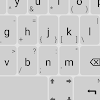
Unexpected Keyboard. No network permission at all, tiny, and it puts symbols on corner swipes, which is excellent for anyone typing code or commands on a phone.

A full PC-style layout with real arrow keys and modifiers. Cramped on a small screen, invaluable on a tablet or over a terminal session.

The stock Google keyboard is included here with a caveat: it is a good keyboard and its offline settings are real, but it is not a no-network app.

FUTO Keyboard. Offline prediction and on-device voice typing, with no network permission at all.

HeliBoard. An actively maintained open source keyboard with good multilingual support.

OpenBoard. The project the previous keyboard grew from, still widely used.

AnySoftKeyboard. Open source, highly customisable, and many language packs.
Simple Keyboard. No prediction, no network, no emoji search. Exactly what the name says.
Mainstream keyboards, configured tightly
If you want swipe typing and strong prediction, the mainstream options are better at it. Both can be tightened considerably.

Excellent prediction, particularly across two languages at once. Turn off cloud personalisation and account sync in settings if you do not want the data leaving.

Facemoji. Popular for themes and emoji; read its privacy settings before using it for anything sensitive.

GO Keyboard. Enormously popular for themes. It is a cloud keyboard, so treat it as the opposite of the offline options above.

TouchPal. Fast gesture typing, with the same caution as other cloud keyboards about what it collects.
- Turn off personalisation and sync Both send typing data to improve prediction. Local learning still works.
- Turn off sticker and GIF search It is a search box that queries a server on every keystroke.
- Use on-device voice typing Most phones support it now, and it is faster as well as private.
- Check what the keyboard can see in password fields Well-behaved keyboards do not learn from them. It is worth confirming in settings.
What you lose going offline
- Autocorrect and local learning
- Swipe typing, in most offline keyboards
- Multiple layouts and languages
- Clipboard history, where offered
- Cloud prediction that adapts across devices
- Emoji and GIF search
- Keyboard translation
- Dictionary sync to a new phone
The dictionary point is the one that stings. Moving to a new phone means retraining, unless the keyboard exports its learned words to a file, which the offline options generally do.
If it has no network permission, it cannot send anything. If you want prediction anyway, turn off personalisation, sync and sticker search.
Frequently asked questions
Can a keyboard see my passwords?
Technically it receives the keystrokes. Reputable keyboards do not learn from or transmit password fields, and a keyboard with no network permission cannot transmit anything at all.
Is the stock keyboard private?
Reasonably, with cloud features disabled. It still has network access, so it comes down to trust rather than to capability.
Do offline keyboards support swipe typing?
Some do and some deliberately do not. Check before switching if it is the feature you rely on.
Read next
A dot in the wrong city is not a broken receiver. It is a WiFi network that moved house.
There is no print button. There is a print service, and an entry in the share menu.
Aeroplane mode and a turn-based game will outlast any setting inside the game itself.
Read next
A search engine gives you a definition. A dictionary tells you how the word behaves.
A contraction timer is a stopwatch with good manners. It is not monitoring anything.
Every one of these apps is a location service with a chat attached. It is worth knowing what it is broadcasting.
